Xero Chart of Accounts UAE: A Practical 2026 Setup Guide
Introduction
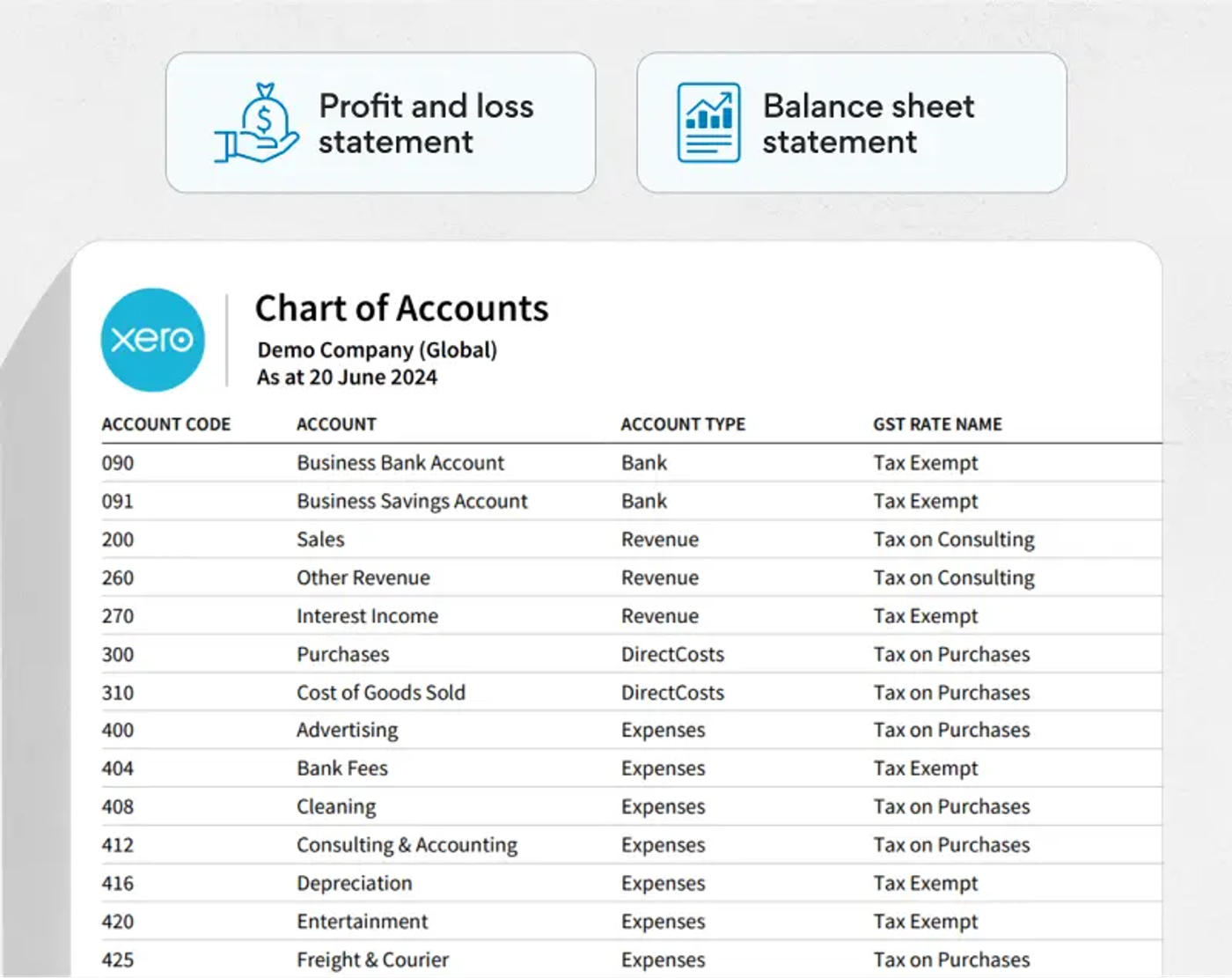
A good Xero chart of accounts for a UAE business should be simple, deliberate and built around how the company actually reports. Xero gives every organisation a default chart of accounts, but UAE businesses should review it before live bookkeeping begins. The goal is not to create hundreds of accounts. The goal is to make revenue, costs, assets, liabilities, owner balances, VAT-sensitive transactions and management reporting easy to understand and reconcile.
Xero defines a chart of accounts as the list of accounts used to record transactions in the general ledger and group similar transactions for reporting. Xero's UAE guidance divides those accounts into the familiar categories of assets, liabilities, equity, revenue and expenses. See Xero's chart of accounts definition.
What a UAE Chart of Accounts Should Achieve
What should a UAE Xero chart of accounts achieve?
The chart should do four jobs at the same time: make day-to-day coding easy, produce useful management reports, support clean VAT review, and produce financial information that can be used for year-end and UAE Corporate Tax work.
- Bookkeeping: staff should know where a transaction belongs without guessing between five nearly identical accounts.
- Management reporting: revenue streams, major cost categories and key balances should be visible without rebuilding the accounts every month.
- VAT: account defaults should not push users toward the wrong tax treatment, and zero-rated, exempt and out-of-scope transactions should not be conceptually mixed together.
- Corporate Tax and year-end: the ledger should make it possible to identify items that may need tax adjustments, supporting schedules or additional review.
Chart Structure
How Xero structures the chart of accounts
Xero uses a relatively flat chart structure. Its setup guidance says the standard chart contains income, expense, asset, liability and equity accounts, and that the chart assigned at organisation creation can be edited or replaced with an imported chart. Xero also explains that the account type controls where the account appears in financial reports.
That makes account type more important than cosmetic numbering. A bank account coded as an expense or a shareholder loan coded as revenue can distort the financial statements even if the account name looks sensible.
Sample Chart of Accounts
A practical chart of accounts for a UAE service business
There is no single statutory chart of accounts that every UAE SME must copy into Xero. The correct structure depends on the business. A consultancy, ecommerce company, trading business and restaurant will need different levels of detail. The following structure is a practical starting point for a service-led SME.
Assets
- Business bank accounts, with a separate Xero bank account for each real bank account and currency.
- Petty cash and cash-on-hand, where genuinely used.
- Accounts receivable, normally handled through Xero's system account rather than a custom debtor account.
- Prepayments and deposits paid, if material enough to track separately.
- Fixed assets grouped sensibly, such as computers, office equipment, furniture and vehicles.
- Payment gateway and merchant clearing accounts for Stripe, card terminals or marketplaces where deposits arrive net of fees.
Liabilities
- Accounts payable, normally through Xero's system account.
- Accrued expenses for costs incurred but not yet invoiced.
- Loans and finance balances separated by lender where useful.
- Employee or payroll-related liabilities where the payroll workflow requires them.
- Corporate Tax payable when a liability has been recognised.
Equity and owner balances
- Share capital.
- Retained earnings.
- Shareholder or director current accounts, separated from ordinary business income and expenses.
A common SME mistake is posting owner-funded expenses directly to revenue or miscellaneous income. If a shareholder pays a company bill personally, the substance may be an amount due to the shareholder rather than income. Keeping owner balances separate makes both the balance sheet and related-party review clearer.
Revenue
Split revenue only where the distinction is genuinely useful. A consulting business might use Consulting Revenue, Implementation Revenue and Subscription Revenue. A business with one service line may be better with one revenue account than six artificial categories that nobody uses consistently.
Operating expenses
- Payroll and staff costs.
- Rent and office costs.
- Software and subscriptions.
- Professional and legal fees.
- Marketing and advertising.
- Travel and transport.
- Bank and merchant fees.
- Insurance, utilities, telecommunications and other recurring overheads.
VAT & General-Ledger Accounts
Should VAT have separate general-ledger accounts?
Do not design the chart as if every VAT category needs its own manual general-ledger account. In Xero, tax treatment is driven by tax rates applied to transaction lines, and Xero's API documentation confirms that where no tax type is supplied, the system can use the default tax rate attached to the chart-of-accounts code.
That makes account defaults powerful but potentially dangerous. Setting a purchase account to a 5% VAT default can save time for ordinary domestic costs, but it can also encourage incorrect VAT recovery where the transaction is exempt, outside scope, subject to reverse charge, unsupported by a valid tax invoice or otherwise not fully recoverable.
For the detailed tax-code setup, use Maaliya's Setting Up Xero for UAE VAT: Step-by-Step Guide. The chart of accounts should support VAT coding, not replace the VAT logic.
Run a quick health check on your VAT treatment before it turns into a filing problem.
Check VAT Health NowCorporate Tax Impact
How the chart of accounts affects UAE Corporate Tax
For UAE Corporate Tax, the accounting result matters because the FTA explains that taxable income starts from the business's accounting net profit or loss, followed by the adjustments required under the Corporate Tax rules.
That does not mean the chart of accounts itself calculates Corporate Tax. It means a clean ledger makes the tax computation easier to prepare and defend. Accounts that may deserve separate visibility include entertainment, fines and penalties, donations, related-party charges, interest and finance costs, owner or connected-person transactions, fixed-asset disposals and other items that frequently need tax or year-end review.
The FTA also expects taxable persons to maintain financial statements and the records supporting information in Corporate Tax filings. A chart that lets the finance team trace balances back to supporting documents therefore improves more than reporting convenience: it improves the quality of the audit trail. See the FTA's record-keeping guidance for Corporate Tax.
Account Codes
Use account codes, but do not over-engineer them
Account codes can make the chart easier to scan and keep similar accounts together. A simple numbering convention might place assets in the 100s, liabilities in the 200s, equity in the 300s, revenue in the 400s and expenses in the 500s or 600s. This is an internal convention, not a UAE legal requirement.
Keep enough gaps between codes to add accounts later. For example, 500 Software, 510 Professional Fees and 520 Marketing is easier to extend than numbering every expense consecutively with no room for growth.
Adding New Accounts
When should you create a new account?
Create a new account when the distinction changes a decision, control or reporting outcome. If management genuinely wants to know monthly cloud-software spend, a separate Software & SaaS account is useful. If nobody will ever analyse stationery separately from small office consumables, two accounts add noise rather than insight.
A useful test is: if this account disappeared and its transactions were merged into a sensible neighbouring category, would anyone lose important information? If the answer is no, you probably do not need the extra account.
Common Mistakes
Common UAE Xero chart-of-accounts mistakes
1. Accepting the default chart without review
Xero's default chart is a starting point, not a diagnosis of your business. Review the account names, types, tax defaults and reporting usefulness before importing months of transactions.
2. Creating too many accounts
A chart with multiple versions of 'Office Expense', 'Admin Expense', 'General Expense' and 'Miscellaneous Expense' gives users more ways to code the same transaction inconsistently.
3. Using account names to solve VAT instead of tax rates
Accounts such as 'Zero Rated Expense', 'Exempt Expense' and 'VAT Expense' can become a workaround for weak tax coding. Separate an account only when the financial reporting distinction is useful; use the proper VAT treatment for the tax classification.
4. Mixing shareholder transactions with operating expenses
Owner-funded expenses, withdrawals and amounts due to or from shareholders should be identifiable. Mixing them into ordinary sales and expenses weakens the balance sheet and makes related-party review harder.
5. Posting payment-gateway deposits straight to revenue
A card processor may settle AED 9,700 when customer sales were AED 10,000 because AED 300 was withheld as fees. Posting the AED 9,700 bank deposit directly to sales understates both revenue and merchant fees. A clearing account lets the gross sale, fee and cash settlement reconcile properly.
6. Letting obsolete accounts remain active
Xero allows accounts to be archived when they are no longer needed. Periodically cleaning the list reduces coding errors while preserving historical transactions. Xero explains the available add, edit, archive and delete options here.
Setup Process
A practical setup process in Xero
For the wider implementation sequence, including organisation settings, opening balances, bank feeds and invoices, use Maaliya's Xero UAE Setup Guide.
- There is no universal UAE Xero chart of accounts that every company should copy; customise the structure around the actual business and reporting needs.
- Keep the chart relatively lean. Extra accounts are useful only when they improve reporting, controls or tax review.
- Review account types carefully because they affect where balances appear in Xero's reports.
- Review account-level VAT defaults because Xero can use the default tax rate attached to the account during transaction coding.
- Separate shareholder, clearing, financing and material tax-review items so the year-end accounts tell a clear story.
Frequently Asked Questions
Not for ordinary SMEs, in the sense of one universal Xero account list that every business must use. The chart should support the company's financial reporting, tax records and operational needs. Specific regulated industries or reporting frameworks can impose additional requirements, so sector-specific businesses should check their own obligations.
Use it as a starting point, not as a finished design. Remove irrelevant accounts, correct the account types and tax defaults, then add only the categories your business actually needs.
Usually not, just for the sake of the VAT percentage. Xero's tax-rate system should carry the tax classification. Create separate ledger accounts when the underlying financial category itself needs separate reporting.
There is no ideal fixed number. A small service company may work well with a few dozen active accounts, while a trading or multi-entity operation may need more. Consistency and usefulness matter more than the count.
Yes. Xero supports importing a custom chart, including via CSV. Clean the old chart before importing it; otherwise you may simply move years of duplicate and obsolete accounts into the new system.
How Maaliya Helps
How Maaliya can help
A clean chart of accounts is most useful when transaction coding stays consistent after setup. If you are still assessing the wider platform fit, read Is Xero Suitable for UAE Businesses? An Honest 2026 Guide. Maaliya is designed to reduce the manual work around bookkeeping, document processing and UAE-focused finance workflows while keeping Xero as the accounting ledger.
If you already have a messy Xero file, start by reviewing the chart, account defaults, duplicated categories, shareholder balances and VAT-sensitive accounts before automating more transactions. Cleaner automation starts with cleaner accounting structure.
Talk to Maaliya about setting up or fixing your chart of accounts, VAT coding and reporting structure.
Book a free consultation today!Related Maaliya Content

References
Sources
Xero Central: Add, edit or delete an account. Current help article, accessed 20 August 2026.
Xero Central: Set up a Xero organisation for a client. Current help article, accessed 20 August 2026.
Xero Developer: Integration best practices, Taxes. Current documentation, accessed 20 August 2026.
UAE Federal Tax Authority: How do you determine taxable income for UAE Corporate Tax? Page last updated 22 May 2024, accessed 20 August 2026.
UAE Federal Tax Authority: What records should I keep for UAE Corporate Tax purposes? Page last updated 22 May 2024, accessed 20 August 2026.
This article provides general information only and is not personalised tax, accounting or legal advice. UAE tax treatment and reporting requirements depend on the facts of the business and may change; verify material decisions against current FTA guidance.
Like what you read? Add Maaliya as a preferred source on Google.
Built for the UAE.