Best OCR Apps for Xero in the UAE (2026)
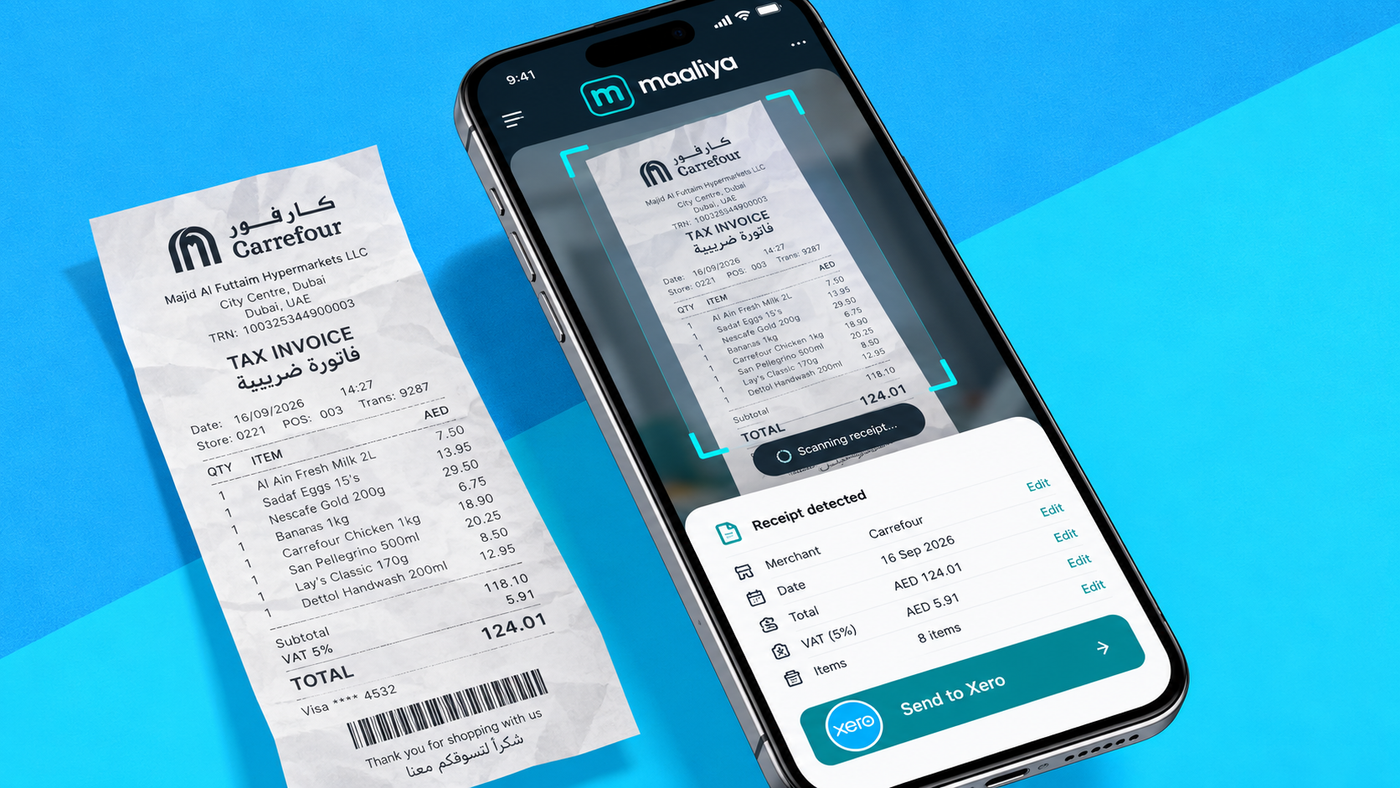
- Choose Hubdoc for a simple, Xero-centred capture workflow when you want fewer systems to manage.
- Consider Dext when document volume, submission channels or pre-accounting review justify a specialist platform.
- If UAE bank statements are your bigger problem, solve that separately with a purpose-built bank statement parser rather than an invoice OCR app.
- If VAT accuracy is the concern, add invoice validation and human review rather than relying on OCR confidence alone.
Overview
The best OCR app for Xero depends on what you are trying to automate. Hubdoc is a sensible starting point for straightforward receipt and bill capture inside the Xero ecosystem, while Dext suits businesses and bookkeeping teams that need a more developed document-capture and review workflow. For UAE businesses, OCR accuracy alone is not enough: VAT extraction, coding controls, duplicate detection, source-document retention and human review all matter just as much.
There is also an important distinction that many comparisons miss: bills and receipts are a document-capture problem, while bank statements are a transaction-data problem. A tool that reads supplier invoices well is not automatically the best way to turn a 40-page UAE bank statement into clean transaction lines.
In this guide:
- What does an OCR app actually do with Xero?
- Hubdoc: the simplest place to start for many Xero users
- Dext: stronger for higher-volume capture and review workflows
- Hubdoc vs Dext for Xero
- OCR accuracy is not the same as bookkeeping accuracy
- Bills and receipts are different from bank statements
- What should a UAE business compare before choosing an OCR app?
- A practical OCR-to-Xero workflow
- OCR is not UAE eInvoicing
- Frequently Asked Questions
- Related Maaliya content
- Sources
What does an OCR app actually do with Xero?
OCR, or optical character recognition, converts information visible on a document into structured data. In a Xero workflow, a capture app can read a supplier name, invoice number, invoice date, currency, subtotal, tax and total, then prepare that information for accounting. Xero's own bills and expenses app directory describes this category as software that turns bills, invoices and receipts into Xero data to reduce manual entry.
The useful part is not simply reading text. A finance workflow needs the extracted fields to be mapped correctly, reviewed, approved where necessary and then posted to the right supplier, account and VAT code in Xero. Good OCR reduces typing; it does not remove accounting judgement.
Hubdoc: the simplest place to start for many Xero users
Hubdoc is Xero's own data-capture tool and appears in Xero's app ecosystem for bills, expenses and documents. Xero describes Hubdoc as a tool for capturing financial documents and bringing that information into the bookkeeping workflow.
Hubdoc makes sense when the requirement is relatively simple: collect invoices and receipts in one place, reduce data entry and attach the source document to the accounting record. It is particularly attractive when a business wants fewer systems rather than a separate specialist pre-accounting platform.
Dext: stronger for higher-volume capture and review workflows
Dext is a dedicated document-capture and bookkeeping automation platform. Its Xero integration supports receipt and invoice capture through mobile, email and upload, then sends extracted information into Xero. Dext currently advertises accuracy above 99%; that figure is a vendor claim, so it should not be treated as a substitute for your own testing and review controls.
Dext becomes more compelling when finance teams process larger document volumes, multiple employees submit expenses, supplier rules need to be standardised, or bookkeepers want a dedicated review queue before publishing into Xero. The trade-off is another system, another subscription and another workflow to govern.
For a deeper product comparison, see Maaliya vs Dext for UAE Businesses: Which AI Bookkeeping Solution Is Better?
Hubdoc vs Dext for Xero
| Hubdoc | Dext | |
|---|---|---|
| Best for | Simple, Xero-centred capture | Higher-volume, multi-channel capture with review |
| Capture channels | Email, upload, mobile | Mobile, email, upload |
| Review workflow | Basic, aligned to Xero | Dedicated review queue before posting |
| Accuracy claim | Not separately advertised | Above 99% (vendor claim) |
| Trade-off | Fewer systems to manage | Another system, subscription and workflow to govern |
OCR accuracy is not the same as bookkeeping accuracy
A document can be read perfectly and still be booked incorrectly. OCR may correctly extract AED 5,250 as the invoice total and AED 250 as VAT, but it cannot safely assume every AED 250 tax amount is recoverable input VAT. The business still needs to consider the nature of the expense, the supplier document, VAT rules and its own tax position.
The UAE Federal Tax Authority's tax invoice guidance shows why field-level review matters: a standard tax invoice includes specific information such as the supplier's name, address and TRN, invoice date, description, VAT rate and amounts. An OCR engine extracting a number labelled 'VAT' does not itself prove that the underlying document satisfies the relevant requirements or that the tax is recoverable.
A good UAE workflow therefore uses confidence thresholds and review. High-confidence routine invoices can move quickly; unusual suppliers, missing TRNs, inconsistent totals, foreign-currency documents or questionable VAT treatment should be routed to a person.
Bills and receipts are different from bank statements
Invoice OCR is usually field extraction: identify the supplier, date, invoice number, tax and total from one document. Bank-statement parsing is row extraction: identify dozens or hundreds of transaction dates, descriptions, debits, credits and balances across multiple pages without losing lines or mixing columns.
That distinction matters in the UAE because Xero users can still encounter manual bank-data workflows. If the real bottleneck is converting Emirates NBD, Mashreq, ADCB or another bank's PDF statements into usable transaction data, choose a purpose-built bank statement parser rather than buying an invoice OCR app and expecting it to solve the same problem.
Maaliya's Bank Statement Parser is designed for that separate workflow. You can also read Best Alternatives to Xero Bank Feeds in the UAE: 2026 Guide and Xero Reconciliation Guide UAE: Step-by-Step for 2026.
Skip the manual re-typing. Maaliya's Bank Statement Parser converts UAE bank PDFs into structured transaction data ready for reconciliation.
Parse your bank statements now!What should a UAE business compare before choosing an OCR app?
- Extraction quality: test real UAE supplier invoices, receipts, Arabic/English layouts, scans, photos and foreign-currency documents rather than relying only on headline accuracy claims.
- VAT fields: confirm the tool reliably captures TRNs, tax amounts, totals and invoice dates, while leaving tax-code judgement under appropriate finance controls.
- Review workflow: look for clear exception handling. The goal is not zero human involvement; it is to concentrate human attention on the transactions that need it.
- Xero posting controls: check how suppliers, accounts, VAT codes, tracking categories, attachments and duplicate documents are handled before enabling aggressive automation.
- Document versus statement workflow: if bank statements are a major source of manual work, assess statement parsing separately from invoice capture.
A practical OCR-to-Xero workflow
For VAT-heavy workflows, pair OCR with a separate invoice-quality check rather than assuming extraction equals compliance. Maaliya's VAT Invoice Checker is intended for this review layer. For Xero configuration, see Setting Up Xero for UAE VAT: Step-by-Step Guide.
Add a review layer for VAT-heavy workflows. Maaliya's VAT Invoice Checker flags missing fields and inconsistent VAT before you post.
VAT Invoice CheckerOCR is not UAE eInvoicing
Scanning a PDF invoice with OCR does not turn it into an eInvoice. The Federal Tax Authority explains that UAE eInvoices are structured invoice data issued and exchanged electronically; PDFs, Word files, images, scanned copies and emails are not themselves eInvoices. OCR remains useful for bookkeeping documents, but it is a different technology and compliance workflow.
Frequently Asked Questions
Xero supports document-capture workflows through its ecosystem, including Hubdoc and third-party apps such as Dext. The exact workflow and available features depend on the product and plan you use.
Dext is generally better suited to higher-volume document capture and bookkeeping workflows. Hubdoc is a strong first choice for simpler needs because it is included with several UAE Xero plans.
OCR can extract VAT-related fields, but the correct accounting and VAT treatment can depend on the transaction and the business's circumstances. Human review and properly configured tax rules remain important.
Some products can read bank documents, but invoice OCR and bank-statement parsing solve different extraction problems. For multi-page UAE statements, use a workflow specifically designed to preserve transaction rows, debit and credit columns, and balances.
Related Maaliya content


Sources
- Xero App Store: Bills and expenses apps / Hubdoc listing. Accessed 15 September 2026.
- Dext: Dext for Xero. Accessed 15 September 2026.
- UAE Federal Tax Authority: Tax Invoices guidance. Accessed 15 September 2026.
- UAE Federal Tax Authority: UAE e-Invoicing. Page updated 11 September 2026; accessed 15 September 2026.
Like what you read? Add Maaliya as a preferred source on Google.
Built for the UAE.