Receipt Scanning for Xero in the UAE: 2026 Guide
Overview
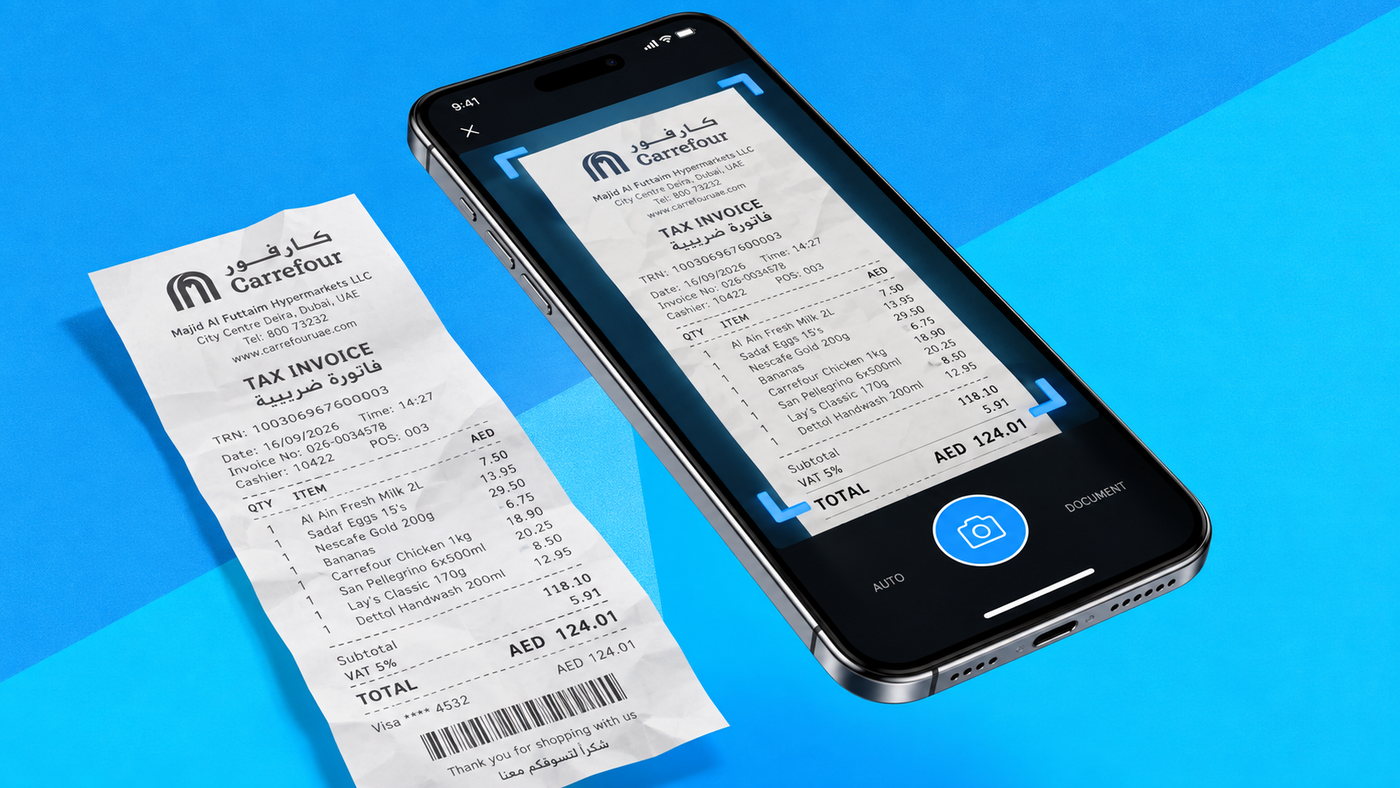
Receipt scanning for Xero can remove much of the typing from expense bookkeeping, but scanning is only the first step. A useful workflow captures the receipt, extracts supplier, date, amount and tax data, checks the accounting and UAE VAT treatment, records the transaction in Xero, attaches the evidence and then reconciles the payment.
In this guide:
- How does receipt scanning work with Xero?
- The old receipt process versus a scanned workflow
- What happens after a receipt is scanned?
- What should UAE businesses check for VAT?
- When is Hubdoc enough, and when do you need a dedicated workflow?
- How Maaliya fits into the receipt-to-Xero workflow
- Receipt scanning is not UAE eInvoicing
- Common receipt-scanning mistakes
- Frequently Asked Questions
- Sources
Book a free consultation to see how Maaliya captures, checks and syncs receipts to Xero, with UAE VAT review built in.
Book a free consultation today!How does receipt scanning work with Xero?
Xero's main document-capture route is Hubdoc. According to Xero's Hubdoc guidance, businesses can photograph, email, scan or upload receipts and bills. Hubdoc extracts key information before the transaction is published to Xero, with the original document attached.
Current Xero Central guidance says documents can be uploaded or dragged into Hubdoc, emailed to an organisation-specific address, photographed with the mobile app or sent through a supported ScanSnap device. The mobile app can upload up to 10 images at once. That means the collection process can be designed around how receipts actually arrive, rather than forcing finance to gather paper at month-end.
The old receipt process versus a scanned workflow
A traditional process often looks like this: an employee keeps a paper receipt, sends it to finance later, someone types the supplier and amount into Xero, chooses an expense account and VAT code, attaches the receipt, and eventually matches the transaction to the bank payment. Every handoff creates another chance for a missing document, duplicate entry or coding delay.
Receipt scanning compresses the data-entry part. The employee or finance team captures the document immediately, software reads the fields, and the transaction enters a review queue. The important distinction is that OCR can read a receipt; it does not automatically know whether the accounting treatment is correct.
What happens after a receipt is scanned?
This is why the best receipt workflow is measured by how little bookkeeping remains after capture, not by how quickly a camera takes the photo.
What should UAE businesses check for VAT?
For a VAT-registered UAE business, extracting a VAT number from a receipt is not the same as validating the tax treatment. The Federal Tax Authority's tax-invoice guidance identifies information expected on tax invoices, including the supplier's name, address and TRN, invoice date, description, VAT rate and VAT amounts, subject to the applicable invoice rules.
For example, software may correctly read a receipt showing AED 525 total and AED 25 VAT. That proves only that the characters were extracted. Finance still needs to determine whether the document is sufficient evidence, whether the purchase relates to the business, whether input VAT is recoverable in the circumstances and which Xero VAT code should be used.
For that reason, use automation to flag missing TRNs, unclear tax amounts or unusual suppliers, rather than automatically treating every extracted VAT amount as recoverable. For more on choosing the right code, see our guide to Xero VAT Codes Explained for UAE Businesses.
When is Hubdoc enough, and when do you need a dedicated workflow?
Hubdoc is a sensible starting point when the main problem is collecting ordinary bills and receipts and reducing manual entry into Xero. Xero describes Hubdoc as its data-capture tool, and its current App Store listing categorises it for bills, expenses and documents.
A dedicated pre-accounting workflow becomes more useful as volume and complexity rise: multiple employees submit documents, finance needs a central exception queue, VAT checks must happen consistently, approval rules matter, or the team handles invoices and other documents as well as small receipts. At that point, capture is only one part of the workflow.
For broader tool choices, see our roundup of the best OCR apps for Xero in the UAE and our guide to Best Xero Add-ons for UAE Businesses in 2026.
How Maaliya fits into the receipt-to-Xero workflow
Maaliya's approach is to treat the receipt as an input, not the finished task. Users can send or upload financial documents, have relevant information extracted and prepared, review items that need attention, and sync approved accounting entries to Xero. The aim is to reduce the manual bookkeeping between receiving a document and having a clean, reviewable transaction in the ledger.
That matters most when document capture is combined with VAT validation and reconciliation. A receipt that has merely been photographed is still work waiting to happen. A receipt that has been extracted, checked, coded, approved, posted and reconciled is a completed finance workflow.
Receipt scanning is not UAE eInvoicing
A scanned receipt, PDF or image does not become an eInvoice simply because OCR reads it. The UAE Federal Tax Authority's eInvoicing page states that eInvoices are structured invoice data created and exchanged electronically; PDFs, Word documents, images, scanned copies and emails are not themselves eInvoices. Receipt scanning remains useful for bookkeeping, but it solves a different problem.
Common receipt-scanning mistakes
- Treating OCR confidence as accounting approval. Accurate extraction can still produce the wrong account or VAT treatment.
- Waiting until month-end to collect documents. The biggest operational gain comes from capturing receipts when they are created or received.
- Automating exceptions. New suppliers, unclear documents, foreign currency and unusual VAT treatment should normally receive more review, not less.
- Stopping after upload. A digital pile of uncoded receipts is still a pile; design the workflow through posting and reconciliation.
Frequently Asked Questions
Xero supports document-capture workflows through its ecosystem, including Hubdoc and third-party apps such as Dext. The exact workflow and available features depend on the product and plan you use.
OCR can extract VAT-related fields, but the correct accounting and VAT treatment can depend on the transaction and the business's circumstances. Human review and properly configured tax rules remain important.
Usually not. Routine, high-confidence transactions may support more automation, while exceptions such as new suppliers, missing VAT details, unusual amounts or uncertain coding should be reviewed before posting.
Some products can read bank documents, but invoice OCR and bank-statement parsing solve different extraction problems. For multi-page UAE statements, use a workflow specifically designed to preserve transaction rows, debit and credit columns, and balances.
If UAE VAT is the concern, use Maaliya's VAT Invoice Checker as a review layer before relying on extracted invoice data.
VAT Invoice CheckerRelated Maaliya content

Sources
- Xero, Easy bill and receipt capture included in Xero from today with Hubdoc. Updated 22 November 2023. Accessed 16 September 2026. https://blog.xero.com/small-business-resources/easy-bill-and-receipt-capture-in-xero-with-hubdoc/
- Xero Central, About getting documents into Hubdoc. Accessed 16 September 2026. https://central.xero.com/s/article/About-getting-documents-into-Hubdoc
- UAE Federal Tax Authority, Tax Invoices guidance. Accessed 16 September 2026. https://tax.gov.ae/Datafolder/Files/Pdf/2023/Knowledge%20Center%20Page/VAT11%20-%20Tax%20invoices%20En.pdf
- UAE Federal Tax Authority, UAE eInvoicing. Updated 11 September 2026. Accessed 16 September 2026. https://tax.gov.ae/en/content/uae.einvoicing.aspx
Like what you read? Add Maaliya as a preferred source on Google.
Built for the UAE.