Import VAT in Xero UAE: Practical 2026 Guide

- Imported goods and imported services should not be treated as the same generic Xero purchase workflow, since customs-import data and reverse-charge transactions can reach VAT201 differently.
- For goods imported into the UAE, Box 6 of VAT201 captures imported-goods data, while Box 7 is used to adjust incomplete or incorrect prepopulated import figures.
- Recoverable VAT arising under reverse charge is reported through Box 10, to the extent the business is entitled to recover it.
- Your Customs Registration Number should be linked to the correct TRN so customs import information can be matched correctly in the FTA system.
- Xero's dedicated UAE VAT-return workflow is still marked as coming soon, so Xero should currently be treated as the ledger and working-data source rather than an automatic substitute for VAT201 review.
Overview
For a UAE VAT-registered business, import VAT is not just another 5% purchase code. Imported goods can flow into the VAT return through customs-linked data, imported services and other qualifying imports can be subject to reverse charge, and recoverable VAT must still satisfy the normal input-tax recovery rules. Xero can hold the accounting records, but the UAE-specific VAT return workflow is still being rolled out, so the finance team needs a deliberate import-VAT reconciliation process.
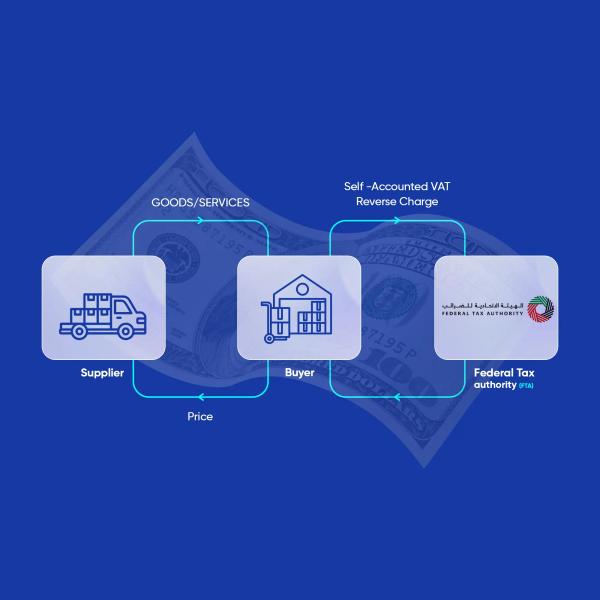
The Federal Tax Authority confirms that VAT is due on goods and services purchased from abroad. Where the UAE recipient is VAT registered, VAT can be accounted for using the reverse charge mechanism; where the recipient is not registered, VAT on imported goods generally needs to be paid before release.
In this guide:
- What Is Import VAT in the UAE?
- Imported Goods vs Imported Services in Xero
- How Imported Goods Appear in VAT201
- Where Recoverable Import VAT Is Reported
- Link Your Customs Registration Number to Your TRN
- How Should Import VAT Be Recorded in Xero?
- Xero's UAE VAT Feature Is Still Coming Soon
- Worked Example: Importing Goods into the UAE
- What If the Import Appears Incorrectly in EmaraTax?
- Common Import VAT Mistakes in Xero UAE
- Import VAT Month-End Checklist
- Frequently Asked Questions
- How Maaliya Can Help
- Sources
Book a free consultation and get your import VAT and reverse-charge treatment reviewed before your next VAT201 filing.
Book a free consultation today!What Is Import VAT in the UAE?
Import VAT is VAT arising when goods or services are brought into the UAE VAT system from abroad. For VAT-registered businesses, the accounting can often operate through reverse charge rather than a foreign supplier charging UAE VAT directly. The economic result may be neutral where the VAT is fully recoverable, but the reporting entries still matter.
A common mistake is to assume that because no UAE VAT appears on the overseas supplier invoice, there is nothing to record. That is wrong in many import situations: the VAT obligation can arise on the UAE recipient even though the supplier charged no UAE VAT.
Imported Goods vs Imported Services in Xero
Imported goods usually need to be reconciled to customs declarations and the import figures appearing in EmaraTax. Imported services are commonly reviewed as reverse-charge transactions based on the supplier invoice and the UAE VAT treatment of the service. The bookkeeping workflow therefore needs enough detail to distinguish the two.
For a trading business, a useful control is to keep customs declarations, freight and duty support, supplier invoices and the Xero transaction linked in the same month-end file. For imported services, retain the supplier invoice and document why reverse charge applies or does not apply.
How Imported Goods Appear in VAT201
The FTA VAT Returns User Guide explains that Box 6 contains goods imported into the UAE. Import VAT is calculated on the import value, which includes the customs value plus relevant insurance, freight, customs fees and Excise Tax where applicable.
Box 7 is the adjustment box for imported goods when the Box 6 information is incomplete or incorrect. The FTA gives the example of an AED 1,000,000 import missing from Box 6: the business can include the missing import amount and corresponding VAT through Box 7.
Box 7 also matters where the import is not actually subject to the default 5% assumption. For example, where imported goods qualify for 0% VAT, the FTA says the taxpayer is responsible for making the necessary adjustment.
Where Recoverable Import VAT Is Reported
The FTA VAT Returns User Guide states that Box 10 is used to recover VAT accounted for under the reverse charge mechanism that was declared in Boxes 3, 6 or 7. The business should include the full net value of the relevant expense and only the amount of VAT that is actually recoverable.
If an import creates AED 5,000 of reverse-charge VAT and the business is entitled to recover all of it, the output-side import VAT and the input-side recovery can offset economically. If only AED 3,000 is recoverable, the unrecoverable AED 2,000 remains a real cost even though the full reverse-charge output amount still needs to be accounted for.
Do not use Box 9 for reverse-charge recovery simply because the transaction is a purchase. The FTA guidance specifically directs reverse-charge recovery to Box 10.
Link Your Customs Registration Number to Your TRN
If you import goods, make sure the Customs Registration Number used for the import is linked to the correct Tax Registration Number. The FTA's EmaraTax guidance says this can be maintained through the VAT registration amendment process, and multiple customs registration numbers can be added where relevant.
If customs data is not linked cleanly to the VAT registration, Box 6 can be incomplete or harder to reconcile. That does not remove the VAT obligation; it increases the amount of manual review needed before filing.
How Should Import VAT Be Recorded in Xero?
There is no single universal Xero tax-code setup that fits every UAE importer. The right structure depends on whether the transaction is an imported good or service, whether it is standard-rated or zero-rated, whether reverse charge applies, and whether the related input VAT is recoverable.
A practical Xero workflow
For the wider coding logic, see Maaliya's Reverse Charge VAT in Xero UAE guide and Xero VAT Codes Explained for UAE Businesses.
Xero's UAE VAT Feature Is Still Coming Soon
As of 26 August 2026, Xero's UAE page still says its dedicated VAT solution is coming soon. Xero says the planned workflow will include FTA-ready return mapping, guided workflows that mirror EmaraTax, an FTA Audit File and a prepopulated upload template.
That means the safest current operating model is: Xero for bookkeeping and transaction-level VAT data, customs and supporting records for import evidence, and a separate VAT201 review before the return is submitted in EmaraTax.
Worked Example: Importing Goods into the UAE
Assume a VAT-registered UAE trading company imports goods with a taxable import value of AED 100,000. If the standard 5% rate applies, the import VAT is AED 5,000. If the company is entitled to recover the full amount, the return can reflect AED 5,000 of output-side import VAT and AED 5,000 of recoverable VAT, subject to the correct VAT201 box treatment and supporting records.
The accounting result can therefore be net nil for the VAT itself, but that does not mean the transaction can be ignored. The import value, output VAT and recovery still need to be captured and reconciled.
What If the Import Appears Incorrectly in EmaraTax?
Compare Box 6 to the customs and import declarations before filing. If an import is missing or incorrect, investigate the customs-TRN link and underlying declarations, then use Box 7 where the FTA guidance requires an adjustment. Keep a working paper explaining every material Box 7 adjustment.
Do not simply force Xero to match EmaraTax with an unexplained journal. First identify whether the difference is timing, a missing customs record, an incorrect taxable value, a zero-rated import, a wrong TRN/customs link or a bookkeeping error.
Common Import VAT Mistakes in Xero UAE
- Using the normal 5% domestic purchase code for imports without considering reverse charge.
- Recording the overseas supplier invoice but never reconciling customs-import data.
- Assuming AED 0 VAT on the supplier invoice means there is no UAE VAT entry.
- Claiming the full reverse-charge VAT without checking whether the input tax is recoverable.
- Putting reverse-charge recovery in Box 9 instead of reviewing the Box 10 treatment.
- Ignoring Box 7 when Box 6 is incomplete or assumes the wrong VAT rate.
- Using one generic import tax code for goods, services, zero-rated imports and non-recoverable VAT.
- Posting a balancing journal to VAT simply to make Xero agree with the return.
For a broader review of errors that affect VAT201, read Common Xero VAT Mistakes in the UAE and the Xero UAE VAT Return Guide.
Import VAT Month-End Checklist
- List all overseas suppliers and import transactions for the period.
- Separate imported goods from imported services.
- Match imported goods to customs declarations and customs values.
- Confirm Customs Registration Numbers are linked to the correct TRN.
- Review Box 6 and investigate missing or unexpected import figures.
- Document any Box 7 adjustments.
- Recalculate reverse-charge VAT where required.
- Check input-tax recoverability and Box 10.
- Reconcile Xero's VAT control account to the draft VAT201 position.
- Retain supplier invoices, customs documents and the VAT working paper.
Frequently Asked Questions
Xero can record the accounting treatment you configure, but its dedicated UAE VAT-return workflow is still marked as coming soon as of 26 August 2026. The business still needs to determine the correct UAE VAT treatment and reconcile imports to VAT201.
No. The cash effect can be nil when the same VAT is fully recoverable, but partial or blocked input-tax recovery can create a real VAT cost.
Box 6 contains goods imported into the UAE, Box 7 is used for relevant adjustments to imported-goods information, and recoverable VAT accounted for under reverse charge can be claimed through Box 10 to the extent permitted.
Yes. Where a business imports goods using a Customs Registration Number, linking it to the correct TRN helps customs-import data flow into the VAT account correctly. The FTA provides an EmaraTax process for maintaining that link.
Do not use No Tax merely because the supplier did not charge UAE VAT. If reverse charge applies, the transaction needs a treatment that records and reports the recipient's VAT obligation correctly.
How Maaliya Can Help
Import VAT problems usually come from disconnected records: the supplier bill sits in Xero, the customs declaration sits somewhere else, and the VAT return is prepared later from a spreadsheet. Maaliya is designed to reduce that gap by bringing document processing, VAT review and reconciliation around the Xero ledger so unusual treatments can be flagged before filing day.
If your import transactions are already in Xero, start by reviewing your reverse-charge codes and reconciling the import population to your VAT working papers.
Check VAT Health NowRelated Maaliya Content
Sources
Federal Tax Authority: VAT Returns User Guide. Current guide accessed 26 August 2026.
Federal Tax Authority: FAQ: Will VAT be paid on imports? Page last updated 22 May 2024; accessed 26 August 2026.
Federal Tax Authority: FAQ: How can I link my customs registration number to my TRN? Page last updated 22 May 2024; accessed 26 August 2026.
Xero UAE: eInvoicing and VAT Software for the UAE. Current page accessed 26 August 2026.
Like what you read? Add Maaliya as a preferred source on Google.
Built for the UAE.